IT Band Stretches: Safe Relief for Outer Knee and Hip Tightness
by Princeton Orthopaedic Associates
IT Band Stretches: Simple, Safe Moves to Ease Outer Knee and Hip Tightness
f the outside of your knee or hip feels tight or sore, your iliotibial band (IT band) may be involved. You can safely reduce that tension with targeted stretches, proper use of foam rolling, and consistent practice for meaningful relief.
Follow step-by-step stretches that target the muscles connected to the IT band, try a quick 10-minute routine, and be aware of common mistakes to avoid. It’s also important to know when it’s time to see a specialist at Princeton Orthopaedic Associates.
What Your IT Band Does and Why It Feels Tight
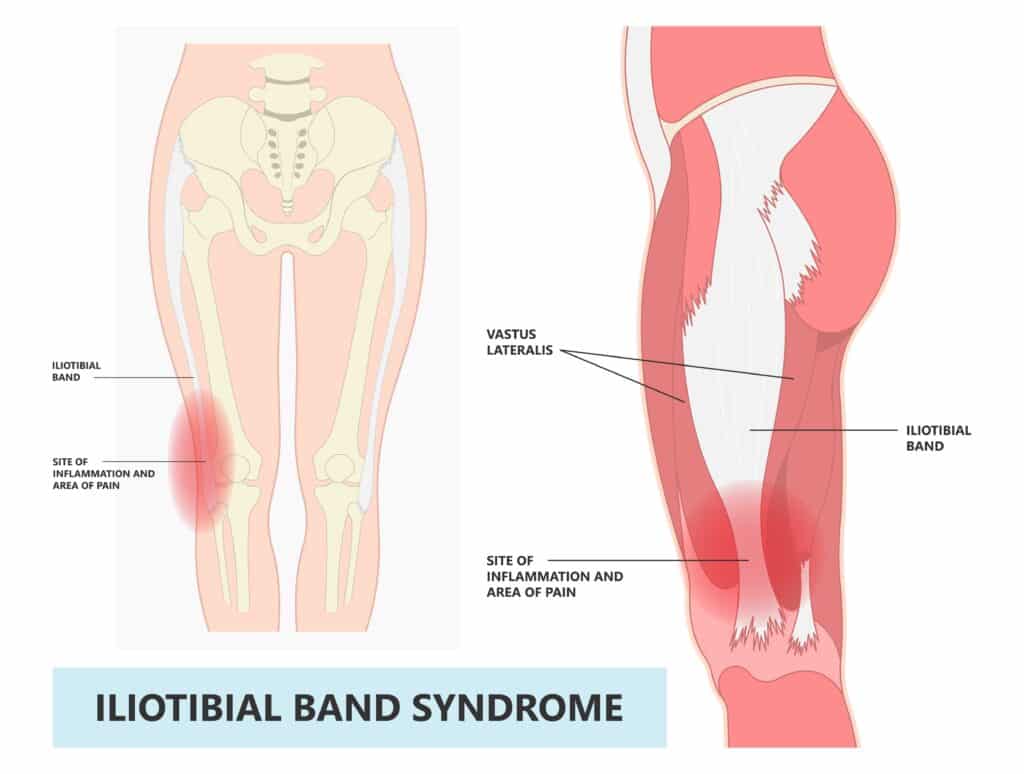
The IT band is a strong band of tissue on the outside of your thigh from your hip to just below the knee. It helps steady the knee while you move. Because it’s not a muscle, you can’t stretch the IT band itself like a hamstring or quad. Instead, you’ll get relief by improving mobility in the muscles that connect to it: the tensor fasciae latae (TFL), glutes, quadriceps, and hamstrings.
Tightness is often linked to repeating the same moves over and over, sitting for long periods, or muscle imbalances around the hip and knee.
Gentle stretching plus smart strengthening offers longer-lasting relief than stretching alone.
Discomfort should feel like a mild, tolerable stretch in the muscle. Sharp or joint pain means stop.
Before You Start: Safety Tips
Warm up with 3 to 5 minutes of easy movement: a short walk or gentle cycling.
Move slowly, avoid bouncing, and breathe normally through each stretch.
Hold each stretch 20 to 30 seconds. Repeat 2 to 3 times per side.
You should feel a comfortable stretch, not tingling, numbness, or sharp pain.
If you have a recent injury, significant swelling, or a joint replacement, ask your clinician which stretches are right for you.
Targeted Stretches That Help Ease IT Band Related Tightness
1) Standing TFL and Outer Hip Stretch (Wall Support)
Stand tall beside a wall for balance. The leg closest to the wall will be your back leg.
Cross the inside leg behind the outside leg. Gently tuck your pelvis under.
Lean your upper body away from the wall until you feel a stretch along the outer hip and upper thigh of the back leg.
Hold 20 to 30 seconds. Repeat 2 to 3 times per side.
2) Seated Figure-4 Glute Stretch
Sit near the front of a sturdy chair, feet flat.
Place your right ankle over your left knee (a figure-4 position). Keep your back tall.
Gently hinge forward from your hips until you feel a stretch in the right glute and outer hip.
Hold 20 to 30 seconds. Repeat 2 to 3 times per side.
3) Half-Kneeling Hip Flexor Stretch With Side Reach
Kneel on a pad with your right knee down and left foot forward.
Gently tuck your pelvis under and shift forward slightly until you feel a front-hip stretch on the right side.
To target the TFL a bit more, reach your right arm overhead and lean your torso slightly to the left.
Hold 20 to 30 seconds. Repeat 2 to 3 times per side.
4) Standing Quadriceps Stretch
Stand and hold a counter or wall for balance.
Bend your right knee and hold your ankle or use a strap. Keep your knees close together.
Gently tuck your pelvis under and avoid arching your low back. You should feel the stretch in the front of the thigh.
Hold 20 to 30 seconds. Repeat 2 to 3 times per side.
5) Supine Hamstring Stretch With Strap
Lie on your back with one knee bent and foot on the floor. Loop a strap around the other foot.
Straighten the strapped leg toward the ceiling until you feel a stretch along the back of the thigh. Keep your knee slightly soft if needed.
Hold 20 to 30 seconds. Repeat 2 to 3 times per side.
Your 10-Minute Stretch Routine: At a Glance
Use this quick reference to build a consistent routine. Aim for most days of the week.
Area
Stretch
Hold
Reps/Side
Frequency
TFL/Outer Hip
Standing cross-over lean
20 to 30 sec
2 to 3
5 to 7 days/week
Glutes
Seated figure-4
20 to 30 sec
2 to 3
5 to 7 days/week
Hip Flexor
Half-kneel with side reach
20 to 30 sec
2 to 3
5 to 7 days/week
Quadriceps
Standing quad stretch
20 to 30 sec
2 to 3
5 to 7 days/week
Hamstring
Supine strap stretch
20 to 30 sec
2 to 3
5 to 7 days/week
Foam Rolling: Where It Helps
Foam rolling can help ease soreness and improve movement around the IT band. Focus on the muscles that affect the IT band instead of pressing directly on the band itself. Move slowly, breathe normally, and stop if anything sharp or lingering hurts. This simple tool can make it easier to glide through stretches and daily activities with less tension in the area.
Glutes: sit on the roller, angle to one side, and work the outer glute area.
Lateral quadriceps: roll the outer front thigh just ahead of the IT band.
TFL (front outer hip): use a small ball or roller to gently address the muscle near the bony front of the hip.
Move slowly for 30 to 60 seconds per area. Avoid direct pressure over the outside of the knee.
Stop if you feel sharp, nerve-like, or lingering pain.
Strength Also Matters
Having balanced strength around your hips and core helps protect the IT band. When the hips and trunk are strong, less stress reaches the outer thigh, and symptoms are less likely to come back. Add simple movements a few days a week to build support and stability for your legs and lower back.
Clamshells and side-lying leg lifts for the gluteus medius.
Bridges or banded bridges for the gluteus maximus.
Lateral band walks and mini-squats with good knee alignment.
Hip hikes on a step and single-leg balance drills.
Start 2 to 3 days per week. Focus on quality form, not speed.
Common Stretching Mistakes
Forcing deep stretches that create sharp pain.
Bouncing or holding your breath.
Ignoring the hips and focusing only on the knee.
Skipping strength work that supports long-term results.
When to Pause and See a Clinician
If any of these signs show up, pause your stretches and seek a checkup. A quick evaluation can stop a small issue from turning into a longer lasting problem. Listening to your body now may save you from more pain later.
Pain lasts more than 1 to 2 weeks despite rest and stretching.
Night pain, swelling, or warmth around the knee or hip.
Catching, locking, or a feeling that the knee might give way.
Numbness or tingling down the leg.
Recent fall or a new injury.
History of hip or knee replacement: confirm safe options with your surgeon or physical therapist.
If you’re unsure which stretches are best for you, our team can help. Sports medicine specialists and physical therapists at Princeton Orthopaedic Associates can tailor a plan to your goals and activity level.
This blog post is meant to be informative and should not act as a self-diagnosis tool. If you’d like to see one of our doctors, please contact us here.
Sequence rules uses cookies to track the order of requests a user has made and the time between requests and makes them available via Cloudflare Rules. This allows you to write rules that match valid or invalid sequences. The specific cookies used to validate sequences are called sequence cookies.
session
cf_ob_info
The cf_ob_info cookie provides information on: The HTTP Status Code returned by the origin web server. The Ray ID of the original failed request. The data center serving the traffic
session
cf_use_ob
The cf_use_ob cookie informs Cloudflare to fetch the requested resource from the Always Online cache on the designated port. Applicable values are: 0, 80, and 443. The cf_ob_info and cf_use_ob cookies are persistent cookies that expire after 30 seconds.
session
__cfwaitingroom
The __cfwaitingroom cookie is only used to track visitors that access a waiting room enabled host and path combination for a zone. Visitors using a browser that does not accept cookies cannot visit the host and path combination while the waiting room is active.
session
cf_chl_rc_i
These cookies are for internal use which allows Cloudflare to identify production issues on clients.
session
cf_chl_rc_ni
These cookies are for internal use which allows Cloudflare to identify production issues on clients.
session
cf_chl_rc_m
These cookies are for internal use which allows Cloudflare to identify production issues on clients.
session
__cfruid
Used by the content network, Cloudflare, to identify trusted web traffic.
session
__cf_bm
Cloudflare's bot products identify and mitigate automated traffic to protect your site from bad bots. Cloudflare places the __cf_bm cookie on End User devices that access Customer sites that are protected by Bot Management or Bot Fight Mode. The __cf_bm cookie is necessary for the proper functioning of these bot solutions.
session
__cflb
When enabling session affinity with Cloudflare Load Balancer, Cloudflare sets a __cflb cookie with a unique value on the first response to the requesting client. Cloudflare routes future requests to the same origin, optimizing network resource usage. In the event of a failover, Cloudflare sets a new __cflb cookie to direct future requests to the failover pool.
session
_cfuvid
The _cfuvid cookie is only set when a site uses this option in a Rate Limiting Rule, and is only used to allow the Cloudflare WAF to distinguish individual users who share the same IP address.
session
cf_clearance
Whether a CAPTCHA or Javascript challenge has been solved.
session
Google reCAPTCHA helps protect websites from spam and abuse by verifying user interactions through challenges.
Name
Description
Duration
_GRECAPTCHA
Google reCAPTCHA sets a necessary cookie (_GRECAPTCHA) when executed for the purpose of providing its risk analysis.
179 days
Google Tag Manager simplifies the management of marketing tags on your website without code changes.
Name
Description
Duration
cookiePreferences
Registers cookie preferences of a user
2 years
td
Registers statistical data on users' behaviour on the website. Used for internal analytics by the website operator.
session
These cookies are used for managing login functionality on this website.
Name
Description
Duration
wordpress_logged_in
Used to store logged-in users.
Persistent
wordpress_sec
Used to track the user across multiple sessions.
15 days
wordpress_test_cookie
Used to determine if cookies are enabled.
Session
WPForms is a user-friendly WordPress plugin for creating custom forms with drag-and-drop functionality.
Name
Description
Duration
wpfuuid
Used to track user interactions with forms.
11 years
Statistics cookies collect information anonymously. This information helps us understand how visitors use our website.
Google Analytics is a powerful tool that tracks and analyzes website traffic for informed marketing decisions.
Used to distinguish new sessions and visits. This cookie is set when the GA.js javascript library is loaded and there is no existing __utmb cookie. The cookie is updated every time data is sent to the Google Analytics server.
30 minutes after last activity
__utmc
Used only with old Urchin versions of Google Analytics and not with GA.js. Was used to distinguish between new sessions and visits at the end of a session.
End of session (browser)
__utmz
Contains information about the traffic source or campaign that directed user to the website. The cookie is set when the GA.js javascript is loaded and updated when data is sent to the Google Analytics server
6 months after last activity
__utmv
Contains custom information set by the web developer via the _setCustomVar method in Google Analytics. This cookie is updated every time new data is sent to the Google Analytics server.
2 years after last activity
__utmx
Used to determine whether a user is included in an A / B or Multivariate test.
18 months
_ga
ID used to identify users
2 years
_gali
Used by Google Analytics to determine which links on a page are being clicked
30 seconds
_ga_
ID used to identify users
2 years
_gid
ID used to identify users for 24 hours after last activity
24 hours
_gat
Used to monitor number of Google Analytics server requests when using Google Tag Manager
1 minute
_gac_
Contains information related to marketing campaigns of the user. These are shared with Google AdWords / Google Ads when the Google Ads and Google Analytics accounts are linked together.
90 days
__utma
ID used to identify users and sessions
2 years after last activity
__utmt
Used to monitor number of Google Analytics server requests
10 minutes
These cookies help us measure the effectiveness of our website content and understand how visitors find and use our site. This allows us to improve the experience and provide more helpful resources.
Facebook Pixel is a web analytics service that tracks and reports website traffic.